Meta Ads Loses Up to 60% of Your Conversions: The Complete 2026 Tracking Guide (Pixel + Conversions API)
TL;DR: In 2026 the Pixel alone misses a large share of conversions due to browser and iOS limits. The standard is dual tracking: Pixel plus the Conversions API (CAPI), which sends events server-side. This restores lost data, trains the algorithm better and lowers cost per conversion. Set up CAPI and watch your event match quality.
You launch a campaign on Meta, you spend the budget, and Ads Manager shows barely any conversions. The creatives are as good as your competitor’s, the offer is solid, yet your CPA jumps around. Before you blame the algorithm, look at the foundation: in 2026, a pixel-only setup physically misses 30–60% of real conversions — and on iOS traffic it loses up to half. This isn’t a bug in your account. It’s the new reality, where browser-based tracking has degraded to “works when it feels like it.”
The good news: the signal comes back. The bad news: dropping the pixel into your <head> and forgetting about it is no longer enough. Let’s break down how conversion tracking in Meta Ads actually works in 2026 — from the Pixel and the Conversions API to deduplication, Event Match Quality, and everything Apple and Meta broke (and fixed) over the past year.
What broke: why the pixel no longer sees half your conversions
The Meta Pixel (yes, technically it’s been “Meta Pixel,” not “Facebook Pixel,” for a while) is a piece of JavaScript that loads in the user’s browser and sends events (PageView, ViewContent, AddToCart, Purchase, Lead) to Meta’s servers. The problem is that the browser in 2026 is a hostile environment:
- iOS App Tracking Transparency (ATT). Apple requires explicit consent to track. Opt-out rates run around 75–85%. The downstream effect on the web: shortened attribution windows and restricted cookies inside in-app browsers.
- Safari and ITP. Intelligent Tracking Prevention cuts cookie lifetimes to a handful of days. Since September 2025, iOS 26 and Safari 26 turned on Advanced Fingerprinting Protection by default and started stripping click IDs from traffic coming out of Mail and Messages.
- Ad blockers and extensions. They simply prevent the pixel from firing — in some verticals that’s tens of percent of the audience.
- Cookie banners and consent. No consent, no browser event.
- Facebook and Instagram in-app browsers. They execute JavaScript inconsistently and severely restrict cookies. Even with a perfect pixel, part of the signal is lost, and the only stable layer here is server-side tracking.
And two events many people missed, then spent a week hunting for “where did my conversions go”:
- On January 12, 2026, Meta retired the 7-day-view and 28-day-view attribution windows. For anyone who hadn’t touched their settings, reported conversions dropped 15–40% overnight. That’s not a drop in sales — it’s a change in the accounting rules.
- On January 13, 2026, Shopify flipped app-pixel data sharing from “Always on” to “Optimized” by default. The data still reaches Meta, but the algorithm weighs it less — so optimization degrades or never kicks in.
The takeaway is simple: if your tracking rests on a single browser pixel, you’re feeding Meta’s algorithm incomplete and noisy data. And the algorithm optimizes on exactly the signals it receives.
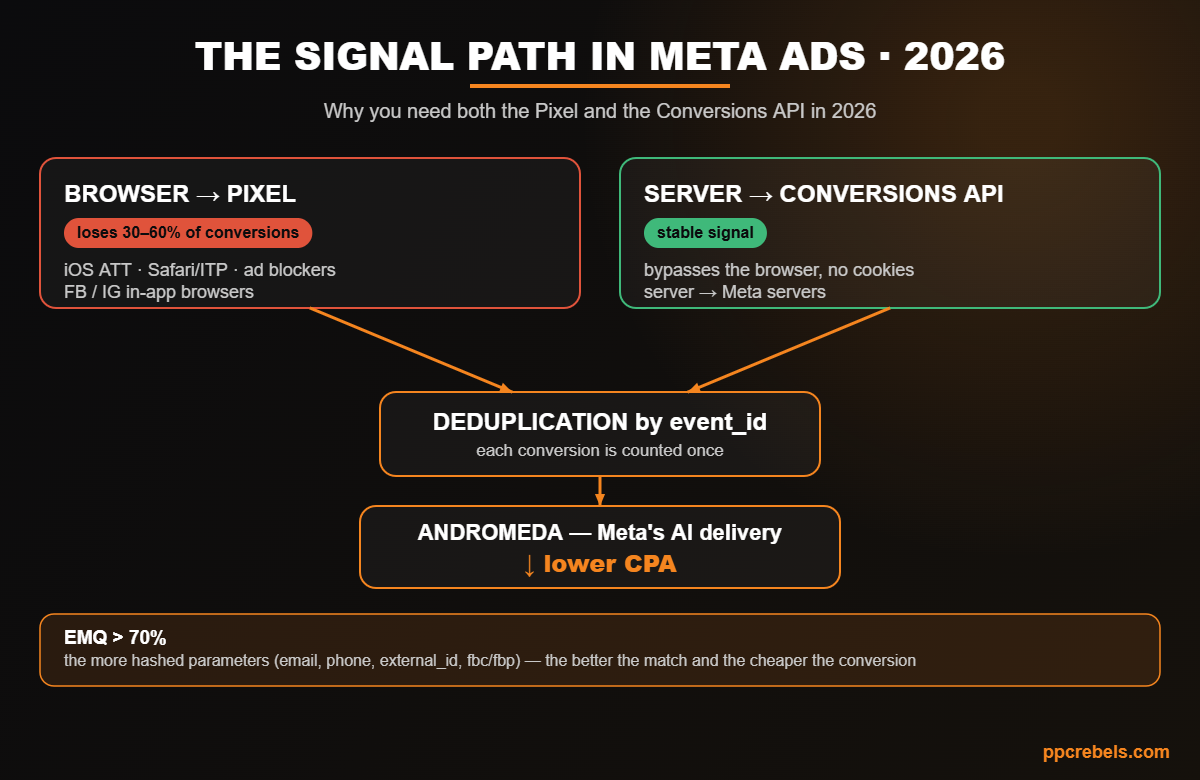
event_id merges them into a single conversion.The 2026 standard: dual tracking (Pixel + Conversions API)
Meta explicitly recommends that every advertiser run the Pixel and the Conversions API together — this is called dual tracking. The division of labor:
- The Pixel (browser) captures what happens on the client in real time: views, behavior, fast interactions.
- The Conversions API, or CAPI (server) sends events directly from your server to Meta’s servers, bypassing the browser and all its restrictions. It’s the only layer that doesn’t depend on cookies, ad blockers, or Safari’s mood.
An important terminology note: in Events Manager, the “pixel” is now called a dataset. The Pixel ID and the Dataset ID are the same thing. Server events are linked to a dataset ID and are processed just like events from the pixel, an SDK, or offline uploads. If you see “dataset” in the interface, don’t panic — it’s your old friend the pixel.
According to Meta (April 2026), advertisers with CAPI set up for web events see on average a 17.8% lower cost per result compared with a pixel-only setup. The number varies by vertical and account size, but the direction is unambiguous: a server-side signal means a cheaper conversion.
How to set up CAPI: five methods — from “one button” to your own server
There are several ways to implement the Conversions API. The choice depends on your stack, your resources, and whether you need offline events and custom logic.
- 1. One-click Meta-enabled CAPI (as of April 2026, the default for most). On the pixel’s Overview tab in Events Manager, there’s now an “Activate Conversions API” button. Meta stands up the server side itself, inherits event settings from the browser pixel, and automatically sets matching
event_idvalues for deduplication. No code, no server of your own. Covers web conversions on typical platforms. Doesn’t cover offline events, custom logic, or cross-channel scenarios. - 2. Partner integration (Shopify, WooCommerce, etc.). The platform ships its own CAPI connector — functionally close to one-click, but sometimes tuned to the specific CMS.
- 3. Conversions API Gateway. A managed, no-code solution from Meta for those who want server-side tracking without development.
- 4. GTM Server-Side (server-side Google Tag Manager). A flexible option via a server container on a cloud (Google Cloud, AWS) or a managed service like Stape.io. Your client-side GTM sends events to your server endpoint, which forwards them to Meta.
- 5. Custom CAPI on your own server. A Node/Python/PHP stack, hand-built JSON payloads, and POST requests to the Graph API. This is development work, but it’s the only path when you need offline events (calls, CRM sales), custom parameters, and events from multiple sources.
A short rule of thumb: a typical store or landing page → one-click or a partner connector; need offline conversions, custom logic, or multiple sources → GTM server-side or custom.
Deduplication: so you don’t count one conversion twice
If you send the same event from both the browser (pixel) and the server (CAPI), Meta receives it twice. To avoid double-counting, you need deduplication — and this is where half of all setups break.
How it works: you attach the same event_id (plus a matching event_name) to the event in the browser and on the server. Meta sees two events with one ID, understands it’s a single fact, and keeps one.
One nuance: Meta deduplicates reliably when the browser event arrives first and the server event second. That’s usually the case: the pixel fires instantly, while server-side processing adds a natural delay. But if your server sends events with significant latency, or the server event arrives before the browser one, Meta may count both. So always verify deduplication.
How to check: in Events Manager, compare the “Browser” and “Server” event counts individually against the deduplicated total. If the combined total roughly equals the larger of the two streams (rather than their sum), deduplication is working. If the total looks doubled, go review your event_id implementation.
Event Match Quality: the main optimization lever in 2026
Here’s the thesis that separates those who understand Meta in 2026 from those stuck in 2021: match quality matters more than event count. A smaller number of well-matched events often beats a larger number of “blind” ones.
Event Match Quality (EMQ) is a metric for how well your events match specific Meta users. The more correct (hashed) customer parameters you pass, the higher the score. Those parameters include: email, phone, first and last name, city/country, external_id, plus the technical fbc, fbp, IP, and User-Agent. All personal data is passed in hashed form — that’s both about privacy and about matching.
The benchmark for matching is above 70%. You can find the score in Events Manager by clicking on a specific event. The logic is direct: high EMQ → Meta understands more precisely who to show ads to → lower CPA. Low EMQ → the algorithm optimizes blind, and no creative tweaks will fix that.
And separately, on data hygiene: Meta explicitly requires events to reflect real users with genuine intent, not bots and accidental clicks. Junk traffic in your events isn’t just useless — it degrades the algorithm’s training. A clean, honest signal isn’t a “compliance checkbox”; it’s the condition for optimization to work at all.
iOS, AEM, and SKAdNetwork: what’s actually going on in 2026
This is where outdated articles pile up, so let’s pin down the current state. Aggregated Event Measurement (AEM) is Meta’s protocol for counting conversions from iOS users (14.5+) who opted out of tracking. Previously (after iOS 14.5), AEM worked like this: you manually selected and ranked up to 8 events per domain, and for opted-out users only the single highest-priority event per session was counted, with reporting delays and no demographic breakdowns. Any reshuffle of priorities triggered a 72-hour cool-down.
What changed: in mid-2025, Meta removed the manual 8-event limit and the AEM configuration tab itself. The system now aggregates all eligible events automatically, behind the scenes, with no manual setup. It also decoupled mandatory domain verification — it’s no longer required for conversion processing (though as a best practice for link and ad-copy control, it’s still useful). Apple’s restrictions haven’t gone anywhere — Meta simply stopped offloading the manual work onto advertisers.
In practice: you no longer need to manually configure the “eight,” but AEM still operates at the domain level, and the server-side signal via CAPI is your main lever for closing the iOS gap. For apps, Apple SKAdNetwork (SKAN) remains in play — that’s a separate mechanism for app campaigns.
Standard events, custom events, and custom conversions: don’t mix them up
- Standard events are predefined triggers the Meta algorithm understands deeply:
Purchase,Lead,AddToCart,ViewContent, and so on. Meta has trained on billions of them. - Custom events are your own triggers for unique logic (
trackCustom). Since a 2025 update, you can optimize and track them directly at the ad-set level without a mandatory custom conversion. - Custom conversions are rules layered on standard or custom events: splitting purchase value ($500 vs $50), filtering by URL, assigning a value to an action.
Critical mistake: don’t replace a standard event with a custom one. If the action is a purchase, use Purchase. Meta optimizes worse for a custom “twin” of a standard event because it doesn’t understand it as deeply. And on value: for value optimization, pass real value and currency, and for subscriptions, predicted_ltv based on actual LTV, not a gut guess.
Andromeda and Advantage+: why a clean signal = money
In 2026, the pixel is no longer “the thing that counts conversions.” It’s one data source feeding Meta’s delivery and optimization system (internally codenamed Andromeda), which consolidates signals at the account level, and the Advantage+ structures. Andromeda aggregates at the account level, but AEM still lives at the domain level — which is why CAPI server-side signals remain the key lever for closing the iOS gap.
In plain terms: the cleaner and richer the conversion signal you feed it, the better Meta’s AI delivery finds paying people. Garbage in — garbage out. It’s the same logic as in traffic arbitrage and CPA marketing, where the quality of your input signals directly determines how well smart campaigns perform.
Attribution in 2026: plan around the new windows
After the 7-day-view and 28-day-view windows went away in January 2026, many reports “got thinner.” That’s no reason to panic — it’s a reason to recalibrate expectations:
- Compare period over period on identical attribution settings, not “before vs after” the window change.
- Remember the reporting delay for conversions from opted-out iOS users: data for the first few days after any change is incomplete. Don’t kill a campaign over a “slump” in the first 24–72 hours.
- For MMM-level analytics, account for the lag in aggregated iOS conversions — otherwise the model undercounts the return on iOS traffic.
GDPR and consent: if you run EU geos — read this
This isn’t legal fluff, it’s money. In February 2026, the Dresden Higher Regional Court ruled that embedding Meta tools (including the Pixel and CAPI) without a valid legal basis under GDPR constitutes illegal data collection, with damages of €1,500 per affected user. For EU traffic that means: consent management (a CMP) and a documented legal basis are no longer optional. On top of that, Meta’s March 2026 DMA compliance report noted that a segment of EU users opted into “less personalized ads,” which sharply cuts the available signal for that group. Bottom line: on EU geos, set up consent honestly — it’s both about avoiding fines and about keeping the remaining signal clean.
Common mistakes that quietly kill optimization
- Treating Events Manager as “set and forget.” It’s a dashboard you check regularly.
- Being happy that “some Purchases are coming through.” Partial data = poor optimization.
- Ignoring deduplication warnings. That’s either double-counting or lost events.
- Tweaking creatives and bids on a broken feedback loop. Without clean data, optimization is guesswork.
- Sending bots and junk traffic into your events. It degrades the algorithm’s training.
Checklist: what to monitor every week
- Pixel vs Server event count — server events should be no fewer than browser events.
- Event Match Quality (EMQ) — keep it above 70%, add more hashed parameters.
- Deduplication — the total isn’t doubled;
event_idmatches on browser and server. - Event coverage — what share of pixel events is covered by CAPI with shared deduplication keys (for agencies, easy to pull via the Dataset Quality API).
- Key event priority —
Purchase/your target conversion in focus, not a “view.” - Events Manager warnings — investigate them, don’t ignore them.
FAQ
You need it. Meta recommends the Pixel + CAPI combo specifically. The pixel captures browser signals and real-time behavior; CAPI recovers what the browser loses. Separately, both are weaker than together.
Essentially it’s a rename in the Events Manager interface. The Pixel ID and the Dataset ID are the same identifier. CAPI server events are linked to the dataset ID.
Not necessarily. As of April 2026, there’s one-click Meta-enabled CAPI right in Events Manager — no code, no server of your own. Development is only needed for offline events, custom logic, and multiple data sources.
By industry estimates in 2026, 30–60% of real conversions, and on iOS traffic the loss reaches half. CAPI closes most of that gap.
Yes. In mid-2025, Meta removed the manual 8-event limit and the AEM configuration tab — events are aggregated automatically. Mandatory domain verification is no longer required for this either (but it remains useful as a best practice).
It’s a metric for how well your events match Meta users. The higher it is (target >70%), the more precisely the algorithm finds your audience and the lower your CPA. You grow it by passing more correct hashed parameters (email, phone, external_id, fbc/fbp, etc.).
Most likely it’s not sales — it’s that Meta retired the 7-day-view and 28-day-view attribution windows. Compare periods on identical attribution settings and budget for the iOS reporting delay.
Bottom line
Conversion tracking in Meta Ads in 2026 isn’t “drop the pixel and forget it” — it’s a living system: the dataset (pixel) plus the Conversions API, deduplication by event_id, high Event Match Quality, and a clean, honest signal. A broken feedback loop can’t be salvaged with creatives or bids — the algorithm learns from exactly the data you feed it. Build the foundation right, and every dollar of budget starts working for optimization instead of leaking into a blind spot.
Want a broader view of analytics in traffic arbitrage — see our breakdown of tracking and analytics in arbitrage. And if you work in Google Ads, check out our overview of how AI is reshaping traffic arbitrage, which also hinge on the quality of your input signals.