Google Ads Automation in 2026: Scripts and Rules That Stand Watch While You Do Strategy
A media buyer burns hours on the same things: checking whether campaigns hit their budget cap, whether junk queries crept in, whether tracking broke, building the report. All of that is machine work. Google Ads automation in 2026 means scripts and rules standing watch 24/7 and waking you only when a decision is needed. The difference between a buyer with automation and without isn’t talent — it’s who spends how much time on routine instead of strategy.
Let’s break down what to automate first, which tools to pick (scripts, rules, API stacks, AI) and where the line is that automation must not cross.
What to automate first
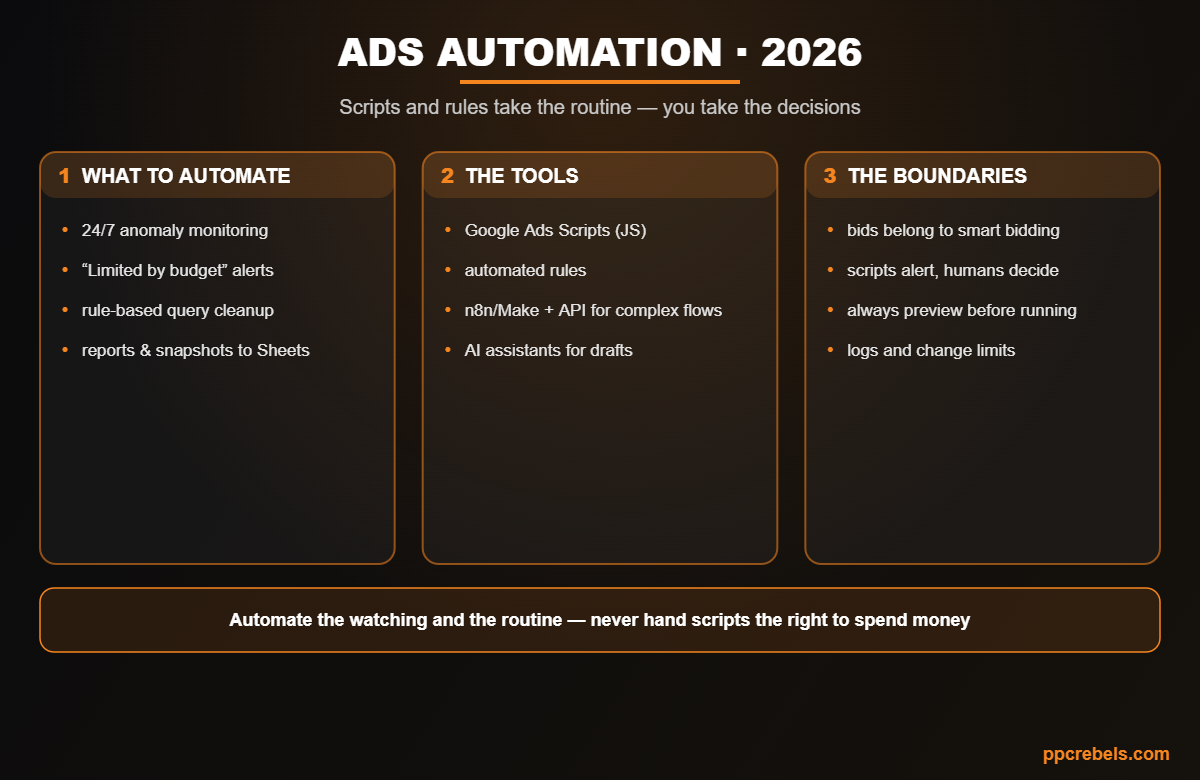
- Anomaly monitoring: a script compares spend, clicks and conversions against history every hour or three and alerts on sharp deviations (budget drained overnight, conversions flatlined = broken tracking, zero impressions = a disapproval).
- “Limited by budget” on winners: the classic silent leak from the account audit — a perfect daily alert.
- Rule-based query hygiene: auto-collect negative-keyword candidates (spend above threshold, zero conversions) into a sheet for approval — the discipline from the match types article, minus the manual slog.
- Reports and snapshots: scheduled metric exports to Google Sheets — plan/actual and trends without copy-paste.
- Link checking: a final-URL crawler script catches 404s and dead landing pages before they eat budget.
The tools: from rules to the API
- Automated rules — the no-code start: conditional pauses, notifications, scheduled status changes.
- Google Ads Scripts — JavaScript inside the account: maximum flexibility for monitoring, reports and bulk operations; at MCC level one script serves every account.
- API + builders (n8n, Make, Zapier) — for CRM, sheet and messenger integrations: Telegram alerts, offline-conversion sync, automated client reports.
- AI assistants — script drafts, error triage, rule generation: they lower the entry bar even without coding experience, but a human still reviews the code.
The boundaries: what automation must never own
- Bids belong to smart bidding, not homemade scripts. “Raise the bid 10% if position below 3” rules are dead: they play blind against an ML auction — targets are set via tCPA/tROAS from the bidding strategies guide.
- Scripts alert — humans decide. Auto-pause is fine only for clear emergencies (budget drain, 404s); everything else is a notification plus a manual call.
- Preview before running: every script goes through preview mode; bulk changes get per-run limits.
- Logs are mandatory: what the script changed, when and why — or the next audit turns into detective work. Automation serves the structure, it doesn’t replace it — see the account structure guide.
Common mistakes
- A homemade bidding script on top of smart bidding — dual control and a rollercoaster.
- Auto-rules without limits reshaping the account overnight.
- “Set and forget” scripts with no logs or error alerts for the script itself.
- Automating chaos: structure first, autopilot second.
- Blindly copying other people’s scripts without reading the code.
FAQ
For rules — no. For scripts, basic JavaScript helps, but AI assistants lowered the bar: the model drafts, the human reads and tests in preview.
Spend/conversion anomaly monitoring plus the “Limited by budget” alert. An hour of setup — and the most common silent losses are under watch.
Don’t: smart bidding uses auction signals a script can’t see. The buyer’s job is the right goal and data, not manual multipliers.
Monitoring — hourly; query hygiene and reports — daily/weekly. The scheduler is built into the scripts interface.
Rules for simple no-code “if-then.” Scripts when you need logic, history, external data or custom reports. They usually live together.
Bottom line
Google Ads automation in 2026 is a division of labor: scripts and rules stand watch (anomalies, budgets, queries, reports, links), smart bidding runs the bids, and the human makes the money and strategy calls. Start with monitoring and alerts, keep logs and preview — and routine stops eating your hours.