TikTok Advertising in 2026: Why Your Pixel Misses Half Your Sales — and How Smart+ and a Creative Wave Turn a Profit
You know the scene: TikTok Ads Manager shows almost zero sales, yet your warehouse keeps emptying. You look at the dashboard, see “wasted spend,” and pause the campaign — when in reality the money was coming in, your tracking just couldn’t see it. In 2026, TikTok advertising is not “upload a video and wait”: it’s a stack of three things, and if even one is broken, you’ll either burn budget or mistake profitable campaigns for losers.
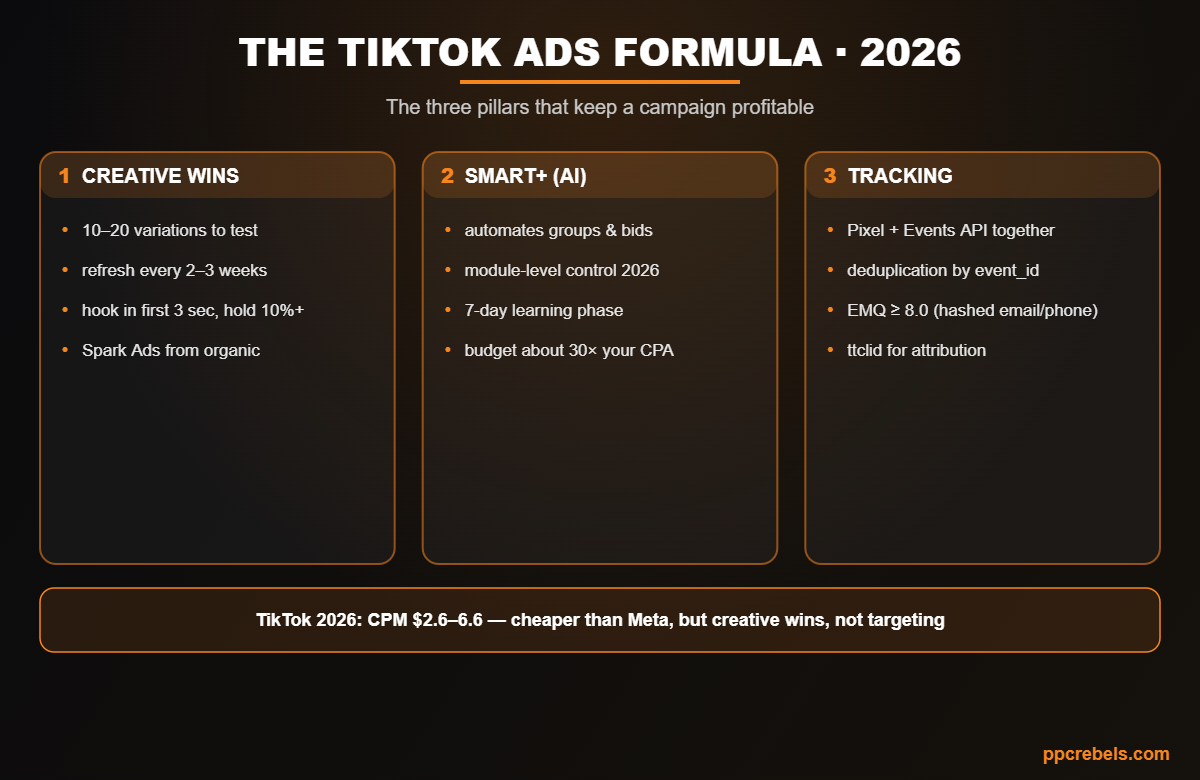
Those three pillars are creative, Smart+, and server-side tracking. Let’s break each one down: why TikTok works differently from Meta and Google, why its pixel physically misses up to half your conversions, how the Smart+ AI automation works, and how to build measurement that survives the mobile environment of 2026.
Why TikTok advertising works differently from Meta and Google
The key difference: on TikTok, creative wins, not targeting. On Meta and Google you can rescue a campaign with precise audience and bid tuning. On TikTok the algorithm finds the people for you — your job is to feed it content that holds attention. CPMs are cheaper here: roughly $2.60–$6.60 versus $9–15 on Meta, so distribution is cheap and creative production becomes the expensive part.
TikTok’s algorithm rewards retention above all: watch time and the first 3 seconds. The single strongest distribution signal and predictor of conversion is the 6-second hold rate (benchmark: 10%+). If a viewer doesn’t make it to that point, the rest barely matters. That’s why you can’t run the same clip for months like you could on Facebook in 2018 — fatigue hits faster.
The in-app browser: why TikTok’s pixel misses up to half your conversions
Here’s the technical reason behind the “empty” dashboard. When a user taps your ad, they land on your site inside TikTok’s in-app browser (in-app WebView) — a restricted environment that limits cookie access, blocks third-party scripts, and strips the identifiers your pixel depends on. Add iOS App Tracking Transparency and ad blockers on top, and the browser pixel captures only 65–80% of real conversions, with 30–50% never reaching TikTok Ads Manager at all.
Important nuance: despite the myth, this isn’t about Chrome “killing cookies” — Google reversed that plan in April 2025. The real, ongoing signal loss comes from Safari ITP, iOS ATT, ad blockers, and that in-app browser. And that’s exactly why TikTok is uniquely vulnerable to browser tracking failures — more so than Meta or Google, where the click more often opens a full browser.
When the optimizer can’t see a conversion, it can’t learn from it — so it bids blind and misallocates budget. A broken signal can’t be fixed with creative or bids. The fix is server-side tracking — more on that below.
Smart+ — TikTok’s AI automation (the PMax and Advantage+ equivalent)
Smart+ is TikTok’s native automation tool, sitting alongside Google’s Performance Max and Meta’s Advantage+. It grew out of the Smart Performance Campaign (SPC), launched in late 2024 and heavily upgraded through 2025–2026. The system generates creative and bid combinations for each auction and serves the one most likely to convert.
What changed by 2026, addressing the main “black box” complaint:
- Module-level automation control. Toggle automation on or off per module — targeting, budget, placements. For example, let the system handle creative testing while you set audiences manually, or lock your bid strategy while the AI manages placements.
- Symphony integration — TikTok’s generative AI suite. Recommended Creatives suggests videos by predicted performance; Automatic Enhancements resizes, dubs, and optimizes your existing assets.
- Manual placement selection in Smart+ Automatic Placement — including TikTok, Lemon8, and the Global App Bundle.
- Objectives: Sales (web purchases), App Promotion, Lead Generation; Value-Based Optimization for ROAS goals.
How to launch Smart+ correctly
Automation doesn’t mean “set it and forget it.” A launch checklist that protects the learning phase:
- Confirm your Pixel and Events API first. The more signals you feed it, the faster the campaign exits learning. It’s a prerequisite for the Web Conversions objective.
- Give it at least 7 days. During the first 7 days, don’t touch the bid, audience, or creative — any edit disrupts learning.
- Budget ≈ 30× your historical CPA (and no less than 10×) for comparable objectives.
- After 7 days, change the bid by no more than 15% every 2 days until performance lands where you want it.
- 4–6 creative assets minimum at launch so the system has something to rotate.
- Bid strategies: Maximum Delivery, Cost Cap, Target CPA, Minimum/Target ROAS. For stable optimization, aim for 50+ conversions per week.
The logic is the same as Google Ads account structure at scale and Performance Max: give the algorithm data density and don’t poke it during learning.
Formats: In-Feed, Spark Ads, Search, and Shop
- In-Feed Ads — the standard in-feed format.
- Spark Ads — boost your own organic posts or creator content. Lower CPMs (the content has already proven engagement), they preserve likes and comments, and require no new upload. Often the best ROI to start with.
- Search Ads — expanded in early 2026 with query matching, but TikTok search volume is 10–20x lower than Google. Good for defending brand terms and capturing existing demand.
- TikTok Shop — in-app checkout. CVR here is 10%+ versus 0.46–2.4% for standard campaigns, plus simpler attribution.
Creative is the strategy
Most advertisers burn budget because they test 2–3 clips and give up. TikTok demands volume:
- 10–20 variations per campaign minimum; top brands generate 20–50 new variations a month.
- Refresh every 2–3 weeks — fatigue hits faster on TikTok than anywhere else.
- Hook in the first 3 seconds, targeting a 10%+ hold rate at 6 seconds.
- Native/UGC style, vertical 9:16, at least 720p, sound on, within the UI safe zone. Polished studio ads get scrolled past.
- Fatigue signals: 2× CPA or half the ROAS versus business as usual, plus declining CTR/CVR over the past 2 days. The fix: add new creatives to the existing ad group, don’t spin up new groups.
Tracking: Pixel + Events API (the same logic as Meta’s Conversions API)
The cure for the “empty” dashboard is server-side tracking. The pixel captures 65–80%; the Events API sends events straight from your server to TikTok’s servers, bypassing the browser and its restrictions. TikTok recommends running both together — by their numbers, that’s +19% events captured and a 15% lower cost per action (April 2025).
- Deduplication: the same
event_idandevent_nameon both pixel and server. TikTok merges duplicates within a short window, keeping the richer server-side version. Check status in Events Manager → Diagnostics. - ttclid (TikTok Click ID): capture it from the landing-page query string and include it in your server event — that gives you attribution even without the pixel.
- EMQ (Event Match Quality) ≥ 8.0: the more hashed match keys (email, phone, IP, ttclid; SHA-256), the higher the match. A high EMQ means 20–30% more attributed conversions.
- Routes: native integrations, server-side GTM (sGTM/Stape), or custom. 2026 caveat: Shopify’s native integration is browser-pixel-only — you add the Events API via a third-party app or custom build.
It’s the exact same “clean signal” philosophy as Meta Ads conversion tracking — only the match keys and EMQ scale differ. If you’re building measurement from scratch, start with the fundamentals in our tracking and analytics in arbitrage guide, and always verify the official parameters against the TikTok Events API documentation.
Attribution: why TikTok is undervalued in reports
Even with perfect tracking, last-click undervalues TikTok — by up to 10.7x, according to Marketing Mix Modeling. The reason: TikTok is strong at the top of the funnel, and conversions often happen later and through other channels. The fix: use view-through windows of 7–28 days and measure brand lift or growth in branded/search volume. TikTok Shop’s in-app checkout further reduces attribution complexity.
Economics: CPC, CPA floor, and unit economics
- CPC $0.80–$2.50 (higher in search due to intent).
- CPA floor for cold traffic: $8–12. That’s the lower bound it’s hard to push below.
- Unit economics at $20–50 AOV: optimize for Add to Cart for the first 14 days (ATC fires 3–5x more often than Purchase → more signal for the algorithm), then switch to Purchase after 50+ purchases. Hold CPA with Cost Cap.
- If AOV is under $20 and margin under 25%, the CPA floor makes unit economics unfavorable. Test a Traffic objective with manual tracking, or another channel — unless LTV is 3x+ your AOV.
Common mistakes
- Pausing campaigns early based on an “empty” dashboard — that’s an attribution gap, not a loss.
- Testing 2–3 creatives and giving up instead of 10–20.
- Editing the bid, audience, or creative in the first 7 days and breaking learning.
- Running the pixel only, with no Events API, on a platform that’s especially vulnerable to browser failures.
- Running polished studio ads instead of native content.
FAQ
At least 10–20 variations per campaign and 4–6 assets in Smart+ at launch. Refresh every 2–3 weeks; top advertisers ship 20–50 new variations a month. Fatigue hits faster on TikTok than on other platforms.
Smart+ is TikTok’s native AI automation (the equivalent of Performance Max and Advantage+). The system assembles ad groups, bids, and creative combinations itself. In 2026 it added module-level control, so you can automate some modules and keep others manual.
Usually it’s not a real loss but lost signal: TikTok’s in-app browser strips identifiers, plus iOS ATT and ad blockers. The browser pixel sees only 65–80% of conversions. The fix is the server-side Events API with event_id deduplication.
Yes. The pixel and Events API work together for redundant coverage of the same event. TikTok estimates +19% events and a 15% lower CPA. Without the server-side layer you lose up to half your conversions and feed the optimizer incomplete data.
Hold rate is the share of viewers who stay to a given second (the key benchmark is 10%+ at 6 seconds). It’s TikTok’s primary distribution signal and strongest predictor of conversion, which is why the first-3-seconds hook is critical.
2026 benchmarks: CPM $2.60–$6.60 (cheaper than Meta), CPC $0.80–$2.50, and a $8–12 CPA floor for cold traffic. TikTok advertising is cheap on distribution, but creative production becomes the expensive part — and usually the real bottleneck, not budget.
A format that promotes an existing organic post (yours or a creator’s). It keeps the accumulated likes and comments, usually delivers lower CPMs, and needs no new upload — a great way to scale what already worked organically.
Bottom line
TikTok advertising in 2026 rests on three pillars: a creative wave that feeds the algorithm; Smart+, which scales that creative; and server-side tracking that keeps you from mistaking profitable campaigns for losers. Break any one and you’ll either burn budget or pause what was making money. Get all three right, and TikTok — with its cheap CPMs — turns from a “confusing Gen Z app” into a manageable performance channel.