Landing Page Speed & Core Web Vitals in 2026: Speed Up Your Page for Paid Traffic
You pay for the click, the user lands on your page — and leaves before it even finishes rendering. Every one of those losses is paid for out of your ad budget. In 2026, landing page speed and the Core Web Vitals metrics affect both conversion rate and your cost per click in Google Ads. Here is the white-hat way to speed up a landing page for paid traffic — no gray tricks, no gaming.
Why landing page speed is money
A slow page hurts your economics twice. First, bounce rate climbs: some paid visits never reach the offer. Second, landing page experience is a Quality Score factor, which feeds into your cost per click. A fast page lowers CPC and buys more impressions for the same budget.
Core Web Vitals: three pillars
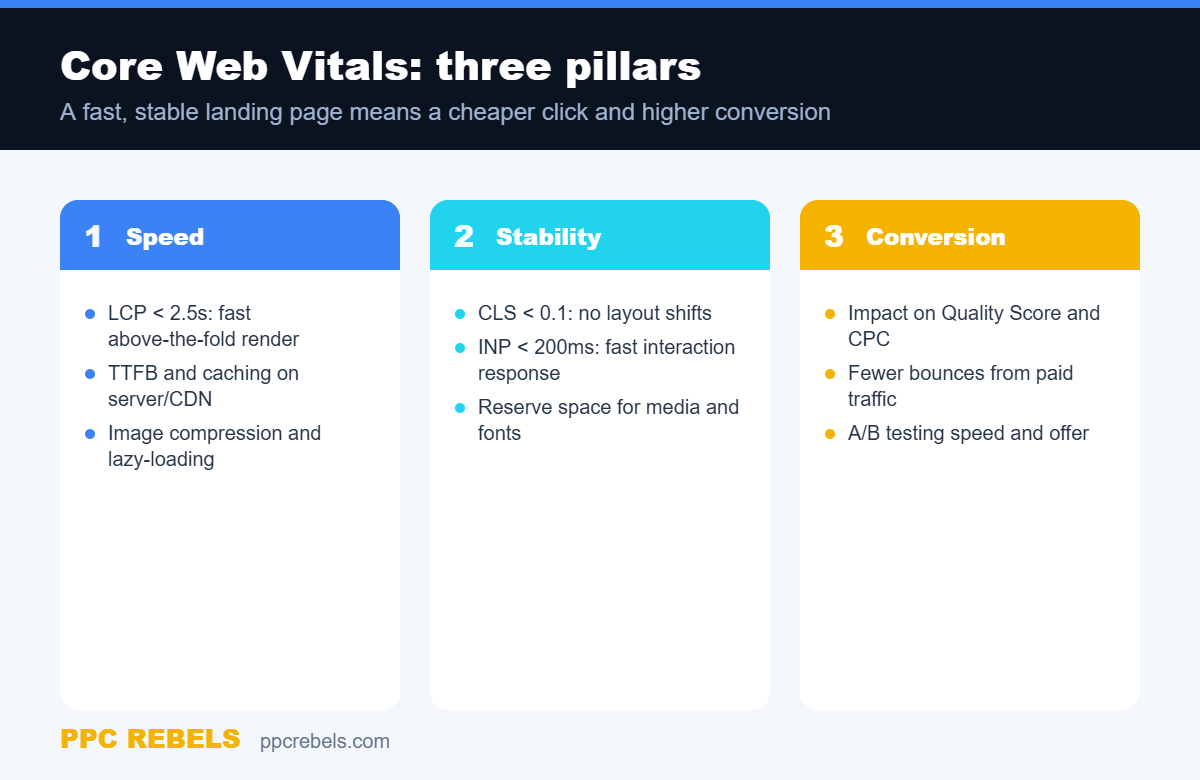
Google grades a page across three metric groups — load speed, layout stability and responsiveness. Below is the schema we use for a quick landing-page audit.
LCP — above-the-fold speed
Largest Contentful Paint measures how long the biggest above-the-fold element takes to render. Target under 2.5 seconds. LCP is most often slowed by heavy hero images, a slow server response (TTFB) and render-blocking scripts. Compress images to modern formats, enable caching and a CDN.
CLS and INP — stability and response
Cumulative Layout Shift measures layout jumps: when a button slides out from under the thumb, users get annoyed and leave. Keep CLS below 0.1 by reserving space for images, banners and fonts. Interaction to Next Paint reflects response delay to actions — target under 200 ms; deferring and trimming JavaScript helps.
What to check on a paid-traffic landing page
- Weight and format of above-the-fold images, lazy-load for the rest.
- TTFB and cache: static via CDN, dynamic with server-side caching.
- Minimal third-party scripts: load chats, pixels and widgets lazily.
- Message match between ad and page — see our breakdown of the landing page for paid traffic.
Speed and conversion
Speed is not the goal itself — it is a conversion lever. Work on speed together with the offer and page structure; our guide to landing page conversion on paid traffic shows how to remove funnel friction. And a fast page improves Quality Score, which lowers your cost in the auction — see our overview of Google Ads bidding strategies.
Test your changes
Validate every speed change on data: compare bounce, depth and conversion before and after. Apply the same testing discipline we describe for creative testing without burning budget, and read field behavior through GA4 attribution. Do not rely on lab metrics alone — watch real-user field data (CrUX) too.
Common mistakes
- Optimizing only for the lab test, ignoring field data (CrUX).
- Heavy video or animation above the fold for the “wow” effect.
- Dozens of third-party scripts that block rendering.
- Ignoring mobile, even though most traffic comes from phones.
FAQ
What Core Web Vitals values count as good?
Benchmarks: LCP under 2.5s, CLS under 0.1, INP under 200 ms. These are the “good” thresholds in Google methodology for the 75th percentile of users.
Does speed affect cost per click?
Indirectly yes: landing page experience is part of Quality Score, which affects Ad Rank and actual CPC. A fast, relevant page is usually cheaper in the auction.
Where should I start?
Start above the fold: optimize the hero image, speed up the server response and remove render-blocking scripts. That usually delivers the fastest LCP gain.
Speed is a white-hat efficiency lever: you are not bending the rules, you are removing friction you already paid for.
Related reading: Deep Links and Web to App Connect in 2026: Where Conversions Leak Between Site and App